REDBOT REVIEW 2026: IN-DEPTH MT5 AI TRADING ROBOT ANALYSIS
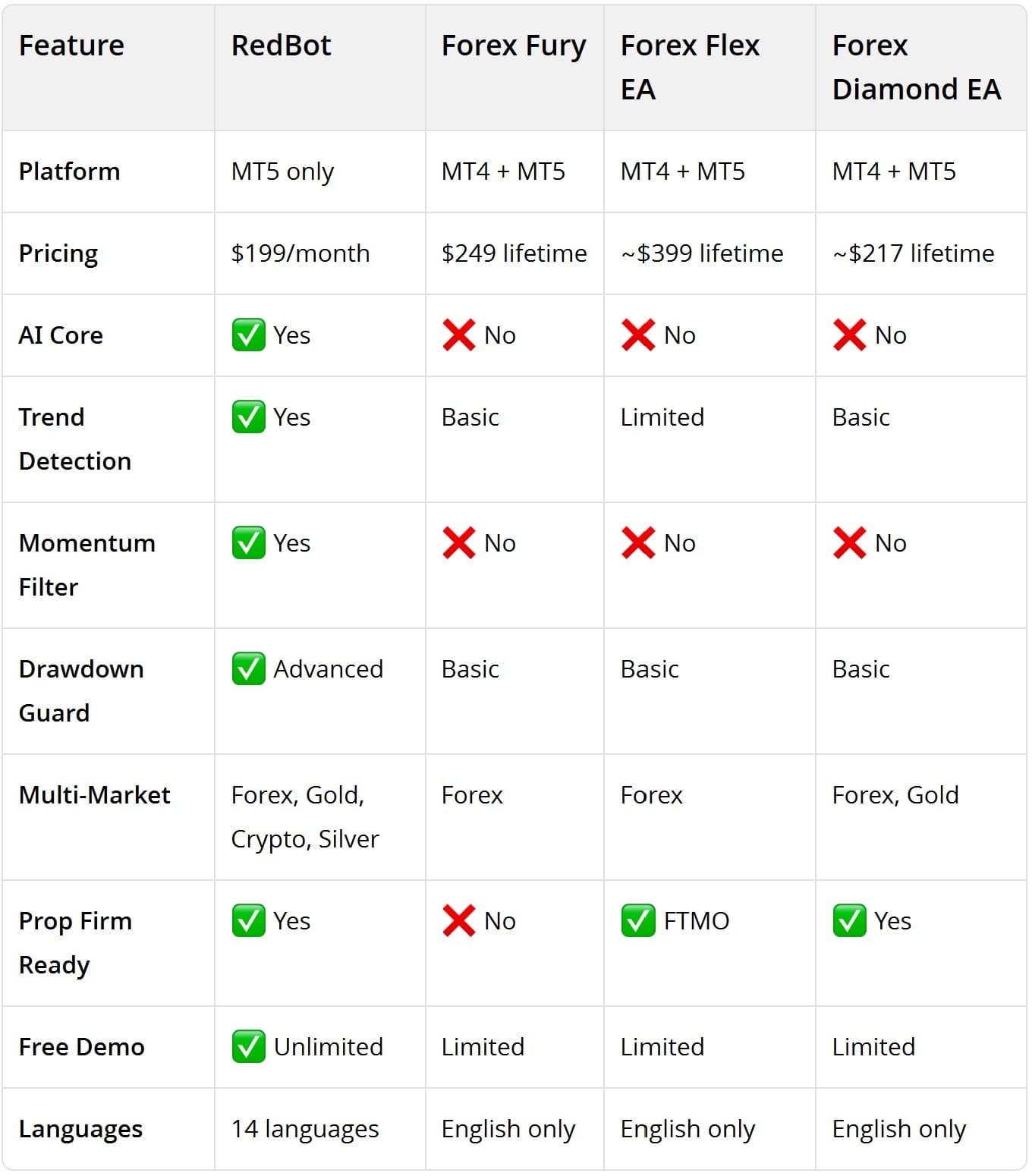
RedBot is a next-generation automated trading robot (EA) for MetaTrader 5, powered by AI trend detection, momentum filters, and intelligent capital management. It supports Forex, Gold (XAUUSD), Silver (XAGUSD), and Crypto (BTCUSD) across all major MT5 brokers. Rating: 4.6/5 — Best for traders who want AI-driven automation with strict risk control.
What Is RedBot?
RedBot is an Expert Advisor (EA) designed for the MetaTrader 5 platform. Unlike traditional EAs that rely on fixed indicators, RedBot uses an AI Core to analyze market conditions in real-time, detecting trends, filtering momentum, and managing risk automatically.
The software operates on a freemium model: you can run it on a demo account forever at no cost. Paid licenses start at $399/month for live trading.
Key Features
AI Core — Real-Time Market Analysis RedBot's AI Core continuously scans multiple timeframes to identify trading opportunities. It supports assets like XAUUSD (Gold), BTCUSD, and major Forex pairs.
Trend Detection Automatically identifies market trends before entering trades. Configurable timeframe (default: M5) and lookback period (default: 35 candles).
Momentum Check A momentum filter that confirms trend strength at each entry point, reducing false signals during ranging markets.
Drawdown Guard Built-in equity protection. When drawdown reaches your defined threshold, RedBot stops trading and preserves remaining capital.
Capital Management Smart lot-sizing algorithm that automatically adjusts position sizes based on account balance and drawdown levels.
Multi-Market Support XAUUSD (Gold) — Gold Snapper v2.1 strategy BTCUSD (Crypto) — Crypto Sniper AI strategy Forex pairs — Trend-following strategies XAGUSD (Silver) — Commodity strategies
Prop Firm Ready Specialized settings optimized for prop firm challenges like FTMO. Strict drawdown control and risk parameters help you pass evaluation phases.
Supported Brokers
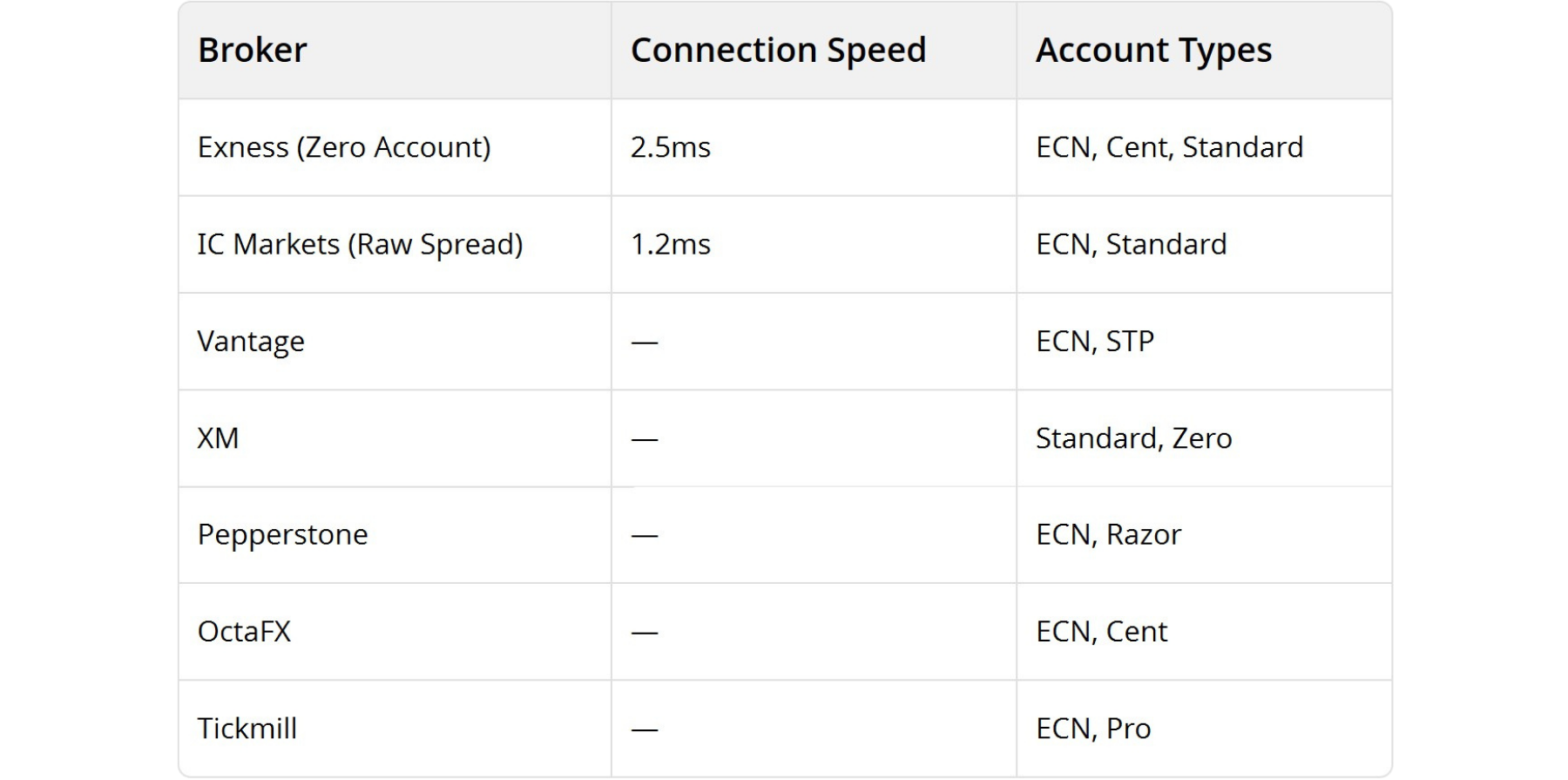
RedBot works with all MT5-compatible brokers, including:
Pricing
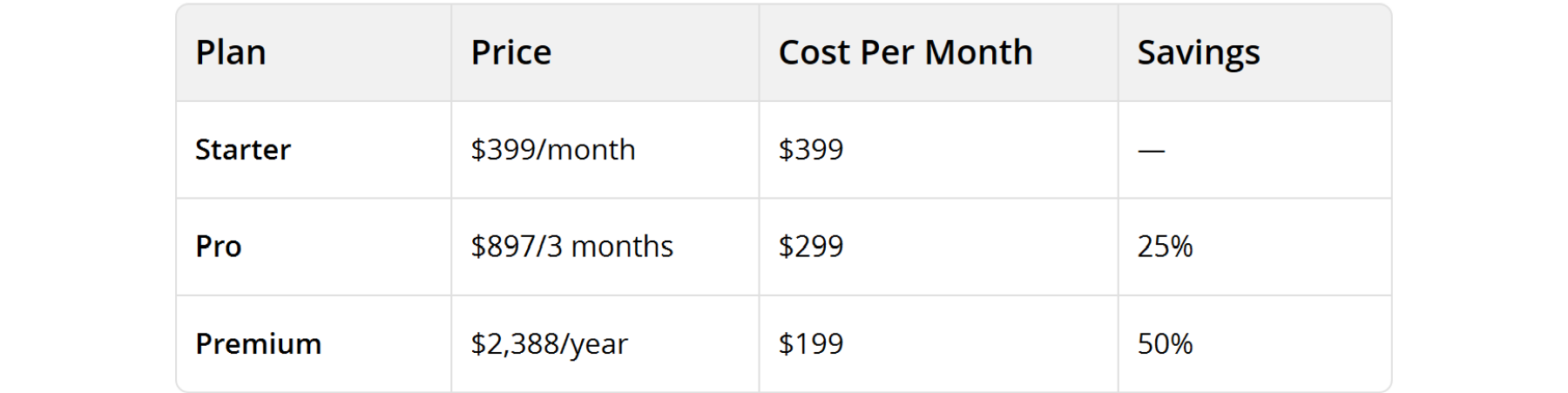
Free Demo: All plans include unlimited demo access. You can test RedBot on a demo account with zero capital risk before purchasing.
RedBot vs Competitors
How to Get Started
Step 1: Register a free account on redbot.trade
Step 2: Download the RedBot Manager (1-click setup)
Step 3: Open MetaTrader 5 and activate your license
Step 4: Configure your risk parameters and start trading
Pro tip: Start with a demo account for at least 2 weeks to understand how RedBot behaves across different market conditions.
FAQ
Is RedBot safe?
Yes. RedBot runs locally on your own MT5 terminal. It does not hold your funds — all assets remain in your personal trading account. Your API credentials are encrypted with AES-256.
Can I use RedBot on multiple accounts?
Each license is tied to one MT5 account. If you need multiple accounts, you'll need a license per account.
Does RedBot work with prop firm challenges?
Yes. RedBot includes specialized settings for prop firm evaluations (FTMO, etc.) with strict drawdown control and risk management.
Is there a money-back guarantee?
RedBot offers a forever-free demo so you can test the software thoroughly before purchasing. Payment is processed through an automated gateway.
What is the minimum deposit?
RedBot recommends starting with at least $400 USC on a Cent account for optimal risk management. Demo accounts require no deposit.
Verdict
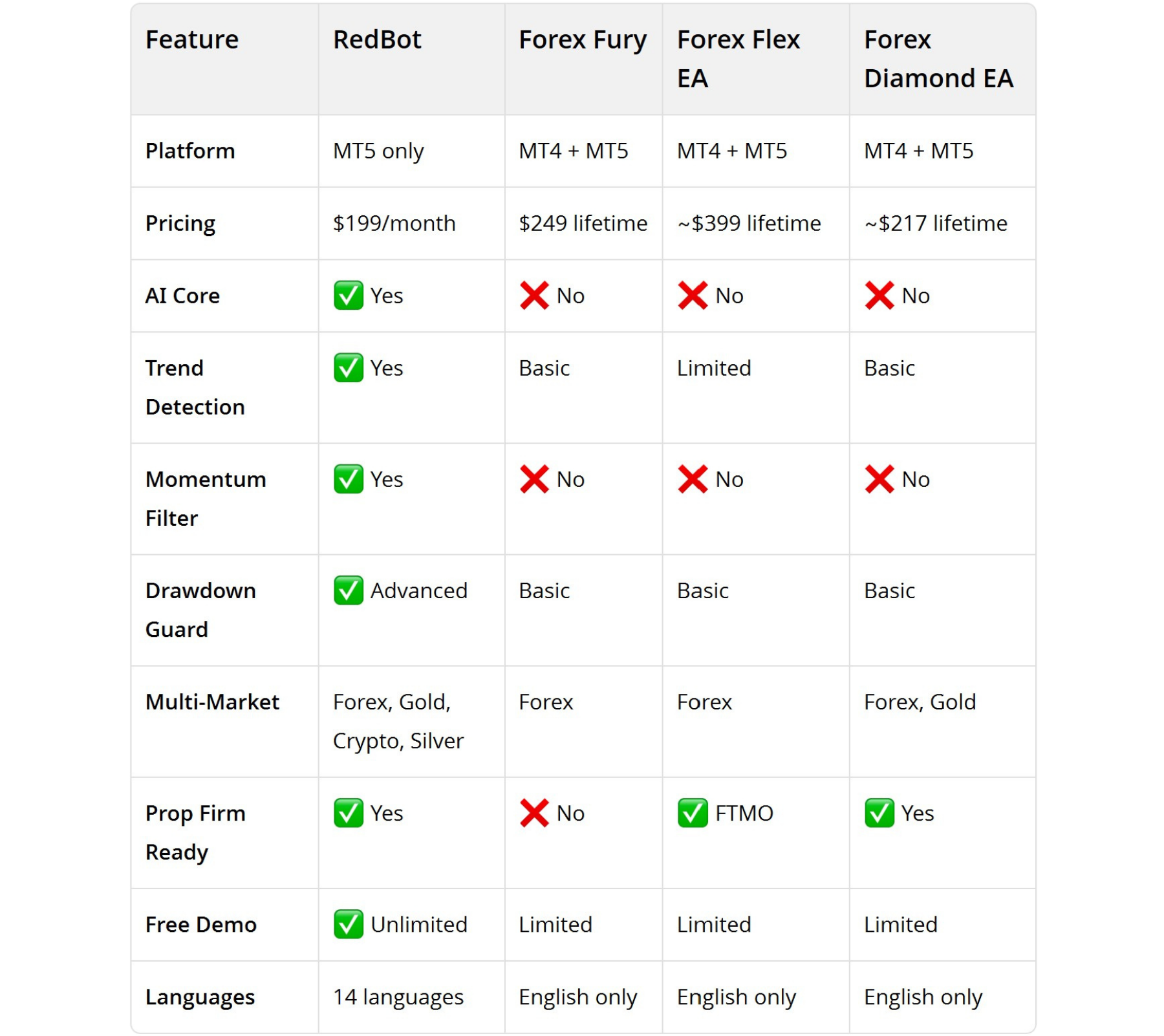
RedBot stands out from traditional EAs with its AI-driven approach to market analysis, multi-market support, and professional capital management. While the subscription pricing is higher than one-time-purchase competitors, the unlimited free demo allows you to verify performance before committing.
Best for: Traders who want AI-automated trading with strong risk controls across Gold, Crypto, and Forex markets.
Rating: ⭐️⭐️⭐️⭐️½ (4.6/5)
Share this insight with your trading network
If you found this article valuable, help us spread the knowledge by sharing it on your social channels.